Table of Contents
This is a part of the Ghost Kit Pro plugin.
Purchase the Pro plugin to access this and other advanced features.
You animate WordPress blocks in Ghost Kit from the Effects panel in the block settings. Select a block, add an effect, and it runs on the front end. Reveal animations are in the free plugin. Scroll, mouse and loop effects are part of Ghost Kit Pro.
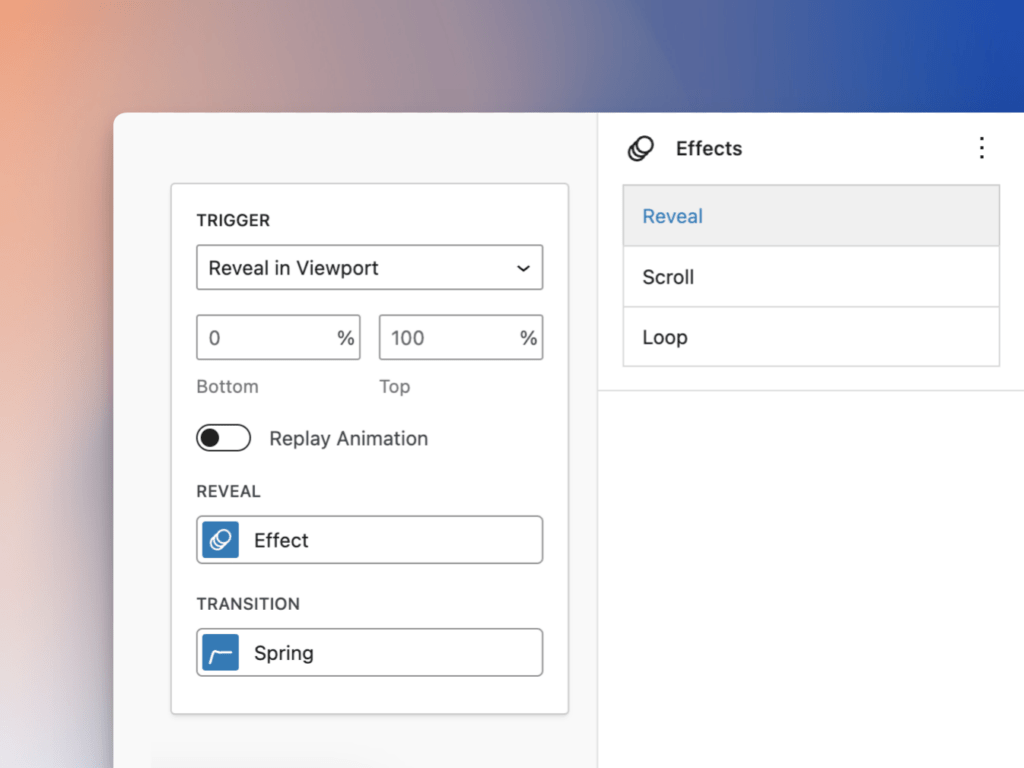
Available Tools
- Reveal
Pro tools:
- Mouse Hover
- Mouse Press
- Mouse Move
- Scroll
- Loop
Stagger inner blocks
Available in Ghost Kit Pro 3.8.0 and later.
Stagger reveals the inner blocks of a block one after another instead of the whole block at once. Each inner block plays the block’s own Reveal settings and Transition.
- Select the block that holds the inner blocks, such as a Group or Columns block.
- In the block settings, open Effects and add Reveal.
- Turn on Stagger. The Delay between field appears.
- Optional. Enter the seconds between one inner block and the next in Delay between. The default is
0.1, and the field takes0to10.
Stagger appears on these blocks:
| Block type | Blocks |
|---|---|
| WordPress blocks | Group, Columns, Column, Buttons, List, Gallery, Social Icons, Cover, Media & Text, Query Loop |
| Ghost Kit blocks | Advanced Columns and its Column, Accordion, Tabs, Alert, Icon Box, Number Box, Testimonial, Pricing Table, Carousel, Toggle Content |
| Ghost Kit Pro blocks | Interactive Group |
An inner block with effects of its own keeps them and is left out of the order. A block with no inner blocks reveals as a whole.
With Replay Animation on, only the reveal is staggered. When the block leaves the screen, its inner blocks hide together.
In Ghost Kit without Pro, the Pro Settings list under Reveal names this setting Animate Inner Blocks One by One.